Build your own custom hotword detector with zero training data and $0!
TLDR : Google TTS - > Noise augment -> {wav files} ->SnowBoy ->{.pmdl models} -> Raspberry Pi
OK, so it’s that time of the year again. You know there’s that thing in the desert. Last time around, I rigged up a Google AIY vision kit and added espeakon Chip and Terra , the art installations of the motley bunch that is BŸTE: Burners for Ÿntelligent Technology Emancipation.
The result was this:
This time around, I decided to add an extra sensory ability: The ability to listen and respond, which in Machine Learning plain-speak translates to rigging up a hotword detection engine that’ll work on-device and offline. Easy peezy no? Hand me the beer perhaps? Read on padawan …
So, I began scouting around for simple off-the-shelf solutions and I chanced upon the awesome SnowBoy __ off-line hotword detector. This came with constraints of course! You could potentially download machine learning models pre-trained to detection specific popular hotwords such as Alexa and Jarvis(See pic below)…
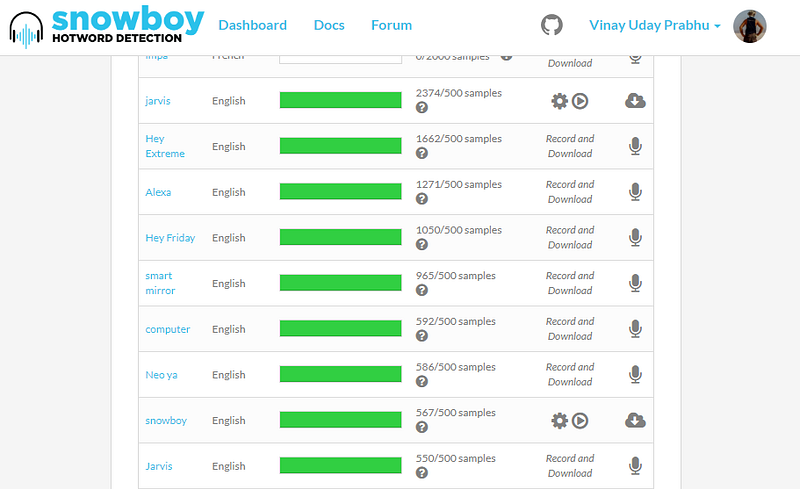 The off-the-shelf available hotword models
.. but in order to truly build your own robust model for the precise custom hotword, you need ~ 500 volunteers contributing 3 samples each. In spite of dipping into my gloriously dirt-poor social media reach, I was able to muster a grand total of ~ 5 donors :’(
 5 donors from my social media campaign!
Seeing this go nowhere, I thought of generating my own dataset. I had recently worked on a couple of synthetic-to-real word transfer learning projects one of which I published at Deep-generative-model workshop at ICLR (See https://arxiv.org/abs/1905.08633), and thought that if WaveNet is indeed so impressive at generating realistic sounding text-to-speech, I could dip into that sweet $300 free Google cloud credits that Goggle doles out to do the data collection for me and transfer learn into the real world with some nifty noise augmentation and yes, unreasonable reasonableness of a deep neural network’s ability to generalize!
Phase-1: Generating the synthetic hotword audio files in different voices using Google TTS
So, I created a temporary GC account, religiously followed the documentation and scribbled some Python code ( Shared here: https://github.com/vinayprabhu/BurningMan2019/blob/master/generate_SYNTHETIC_audiofiles.py ). In about 5 min, I had 189 .wav files of the hot-word I was targeting (which was Hey Chip! BTW) in different accents, or more formally as voices. You can download this entire treasure trove from here.
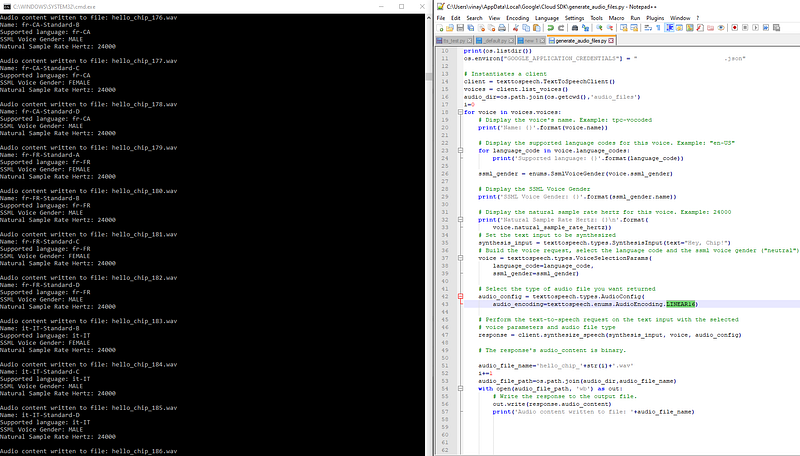 Using Google TTS to generate synthetic training data
Some of the example sounds that were my favorite were these:
Example sound files from the Google TTS engine!
Now that we had these 189 .wav files for the different voices, for each of these voices, I performed plain-vanilla additive white Gaussian noise augmentation to get (189 x 3) wav files. Here is the colab notebook associated with this task.
Phase-2: Training the hot-word detection models using the synthetic noise-augmented wav files
The snowboy technology, as promising as it is, is still is in it’s nascency. The api for training your own models programmatically looks rather restrictive:
python training_service**.** py 1.wav 2.wav 3.wav saved_model**.** pmdl
As seen, you need to feed in precisely 3 wav files to spit-out a model. So, yes. I did generate 189 models per voice (I’d be very very glad to be proven wrong in this regard) and logical ‘OR’ed them together. The colab notebook that ingests the wav files and trains the ML models is shared here: https://github.com/vinayprabhu/BurningMan2019/blob/master/Colab_Notebooks/model_gen.ipynb
Phase-3: Combining together all the models and running them on the Raspberry Pi
OK. So, this phase was kinda tricky. Make sure that you follow this repo’s documentation rather patiently and religiously:
wanleg/snowboyPi
_Start with a fresh install of Raspbian (Lite or Regular, this guide assumes Lite) sudo apt update && sudo apt -y…_github.com
One main source of irritation with audio-projects on Raspberry Pi are the bedeviled ALSA shenanigans, and the ensuing fight between the HDMI, USB-audio and local-audio-out ports for the audio-dominion. In order to circumvent that, I used the good ol’ SAMSON mike in + audio-out rig (Apparently Amazon peddles these at $29.99 now! They are much cheaper on SP road, Bangalore.)
The entire setup looks like this:
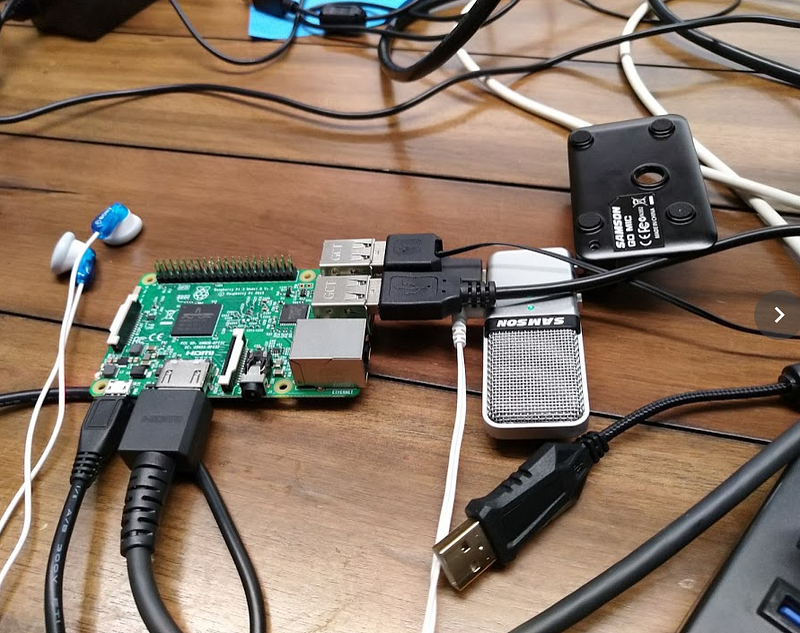 The raspberry pi-3 set-up with the Samson mike
Before beginning the, ahem, human trials, I tried to isolate out the effects of the mike being used by means of a simple test case where I played the Google TTS output audio file on a laptop and checked if the audio-file’s pertaining .pmdl running on the Raspberry Pi would indeed get triggered by the synthetic utterance. The result was gloriously good!
Synthetic data input trials
Now that there was some hope, I began tweaking the snowboy.py script (from here: https://github.com/wanleg/snowboyPi/blob/master/snowboy.py) to include all the .pmdl model files I had just generated so that at least one would get triggered when a real world homo sapien would utter the key words ‘Hey chip!’. It turns out, all you need to do is to add the list of models on line#29 here: https://github.com/wanleg/snowboyPi/blob/master/snowboy.py#L29
FINALE:
Now that all the files are packed in (you never have to worry about the size of these individual DNN models by the way. There are all ~ 10KB each. Impressive work SnowBoy people !), I finally decided to do the final real world test with real human voice inputs and the result was .. *drumrolls*.
Ta..Da! It works! It works rather seamlessly with my normal (Indian accented) voice and my Adam Levine voice.
Phase-4: Deployment on Chip and Terra + casing + playa deployment
I am awaiting for this phase with bated breath. I’ll update this blogpost as soon I get back to the default world!